I have gotten the question over and over again from people, organizations and brands: “How do we start a blog the right way” – I’ve decided to put my advice into writing.
Some of you might think this post is unnecessary. Other people have written about this already. I thought so too until I started searching for good posts on how to set up a kick ass blog and learned most things written on the subject either covered the tool or the actual writing but not actually leading you to do it the right way I think there’s room for another post on the subject.
The purpose of this post is sort of a combination of two things that I hope will lead to the following:
- Make sure agencies cannot charge big money for setting up your blog. Setting up your personal or branded blog is to me a democratic right and should be free and accessible for anyone who has something to share.
- I think more people should start a blog. It’s good for you. It’s good for the democracy. It’s good for the world.
Here is the essential guide on how to start and configure a blog that will rock the world:
1. Buy a unique domain name for your blog and preferably do it at the same place where you intend to host the blog
Personally I’ve followed WordPress own recommendations and used Bluehost.com to buy my domain name and then installed a WordPress blog with their simple script functionality. It’s a 3 minute process from registering that domain until your blog is actually up and running and accessible from anywhere in the world. It’s a wow feeling!
Of course you can pick any hosting facility but if you’re not into setting up databases and shit – make sure they have some sort of simplified way of setting your blog up.
2. Why a WordPress blog?
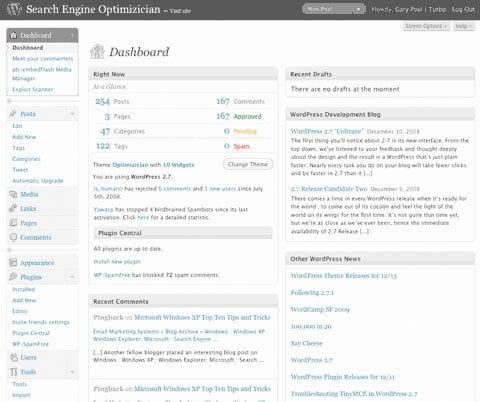
The famous WordPress content management system
There’s of course different blog systems but if you want the best I’d say you should go with Matt Mullenweg’s WordPress. I think most professional bloggers today would agree with me and the stats speaks in favor of me. WordPress is the most used blogging platform (and in many cases content management system) in the world and as a result you cannot find any system that gives you more themes and more plugins.
Matt Cutts who’s responsible for Google’s search engine even says there’s no better tool in the world if you wanna make sure your website is being watched the right way by Google’s spiders.
3. Don’t design your blog. Find a theme that you think suits your needs and tweak it.
Theme is another word for design. WordPress separates functionality from form in the most beautiful way. Swapping between different designs is easier than saying hello in Swahili. What’s even better is the fact that there’s tons of great designs out there for free. However if you intend to turn into a mighty blogger you might look already now look into a paid theme. Woothemes and Themeforest has some sweet themes for any kind of business.
Personally however I prefer the Thesis theme by Brian Clark over at Copyblogger and Chris Pearson. The sweet thing with Thesis is that it can be customized into infinity with hooks and customized functionality. Another advantage with Thesis is the fact that it’s more or less perfectly prepared for Google and other search engines. Once you’ve decided on a theme – upload it with a FTP software of your choice and ad your own logo and style to it. Personally I use CSS Edit to tweak the style sheets but any old CSS tool will do.
4. Set up your WordPress blog right
Once you’ve set up your blog you can login to your domainname.com/wp-admin with your login information. Take some time to get acquainted to the left menu. Later when you start to write you will use the Post menu to start blogging. Of course you can set up a couple of pages too but the actual blogging will be done by adding posts.
5. Change the link structure
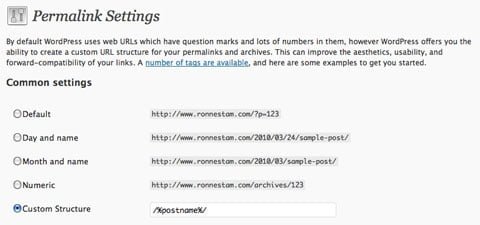
Setting the right permalink is one step closer to success
You don’t want to use the original set up in WordPress when you’re going live. This will decrease the Google traffic. Instead head into the menu settings called Permalinks found under ‘Settings’ and change the permalink structure from https://blog.ronnestam.com/?p=123 to /%postname%/ . There are some different opinions out there which structure is the right one. But I’ve found over time that most people tend to recommend this one.
6. Make sure your blog pings the right blog search engines and portals
Google, Yahoo, Technorati, Swedish Knuff and a lot more sites out there are listing and indexing blogs. WordPress has got this sweet functionality that lets you automatically update these blogging portals once you’ve posted something new. There’s of course different ideas on how to do this. But I’ve decided to share my personal PING information here.
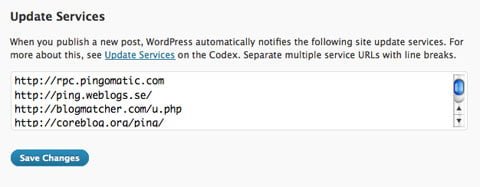
Just ad the ‘code’ below to start updating search engines etc
Copy this information below and enter it into your Update Services option that you’ll find under Settings/Writing
http://rpc.pingomatic.com
http://ping.weblogs.se/
http://blogmatcher.com/u.php
http://coreblog.org/ping/
http://www.blogpeople.net/servlet/weblogUpdates
http://bulkfeeds.net/rpc
http://trackback.bakeinu.jp/bakeping.php
http://ping.myblog.jp
http://ping.bitacoras.com
http://ping.bloggers.jp/rpc/
http://ping.blogmura.jp/rpc/
http://xmlrpc.blogg.de
http://1470.net/api/ping
http://bblog.com/ping.php
http://blog.goo.ne.jp/XMLRPC
http://nyligen.se/ping/
http://blogsearch.google.com/ping/RPC2
http://rpc.twingly.com/
http://rpc.technorati.com/rpc/ping
Copy the ‘code’ above and paste it into the bottom field under the section Writing in settings. This way you’ll make sure your content is visible to the important search engines online.
7. Choose your title wisely
You’re almost done configuring the settings. The last thing you might wanna do is setting up the title of your blog. You’ll find that under General Settings.
Choose this one carefully as you shouldn’t change this one later. Once you’ve earned some page rank and you’re up to speed you don’t wanna make Google angry by messing with this one since it actually sits on ever single post from now on.
8. Download and install the following WordPress plugins
Find and learn how to use an FTP software. That’s important for anyone who wants to keep a website updated. For bloggers it’s essential since WordPress plugins and themes are the corner stones of a good blog. Others have written great stuff how to choose the right FTP for PC or Mac so I’ll leave that part to them.
The essential plugins that I think you need to install for your blog however – that I’ll share here. All your other needs can probably be catered for if you search for WP plugin and whatever you want either on Google or in the WordPress plugin library. Hell, you can even turn your blog into an E-commerce with the right setup.
These are the WordPress plugins I think you should make sure to start with:
Aksimet
Activate the Aksimet plugin to take care of SEO spammers, bots and trolls. No need to download this one – it’s inside WordPress and waiting for you!
Disqus or Intensedebate
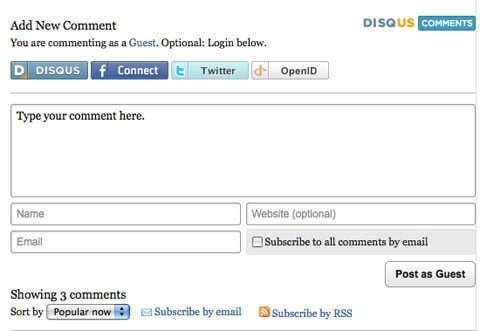
The Disqus plugin let’s people join the conversation
Install a commenting system that treat your conversation right. This is what Disqus and Intensedebate does. On this blog I’ve had Disqus making sure visitors can interact the way the want. Lately however I’ve grown more fond of Intesedebate and only weeks ago I activated that on my Whisky blog in order to try it out. I think maybe I’ll switch on this blog too soon. One advantage with one of these plugins over how WordPress treats comments is the fact that you gain a small social spread over other networks. The biggest advantage however is that people can choose to login and comment with Facebook connect, OpenID, Twitter accounts and personal Disqus or Intense Debate accounts.
WP Super Cache
You’ll do fine without this plugin until the day you do something really really right. Let’s say for example that you end up on the first page of Digg.com, the online social newspaper, then tens of thousands people will swarm your blog for blood (your post that is) and only seconds later your server will crash. WP Super Cache takes care of this and turns every page in to static html pages that lets people ride rodeo over that blog of yours without falling off. You need WP Super Cache.
The All In One SEO Pack or the HeadSpace 2 SEO plugin
Same here. If you’ve gotten Thesis as your theme then move on to the next bullet. If not this plugin is essential. SEO is an art form many people have yet to master. But using the All In One SEO plugin will at least give you the right tools. [updated] Simon Sundén suggested I should ad the HeadSpace2 plugin as an alternative (in his mind better). So now I’ve done that. Thanks Simon!
Tweetmeme Retweet Button
The Tweetmeme retweet plugin is what places a small Tweet This button along every blog post. Just like the green little thing I’ve got on top of this post (press that one please). Sometimes you’ll write posts that people love. Then Tweeting that post is the fastest and simplest way for them to show their love. Other people that might land on your post will be more eager to read through your post if it has been tweeted many times. It’s like a quality mark. Make sure you’ve got an own Twitter account to go with this one since it will earn you followers over time if it’s your ID that is being retweeted.
WP FollowMe
By using the WP Follow Me plugin you’ll get a nice little bird watching over your blog
Make it easy for people to follow you on Twitter. This plugin places a badge to the right (or left if you want) on your blog that makes following you easy.
SexyBookmarks
In the bottom of every post on my blog you can see a set of buttons that lets you share my blog posts easily over your personally preferred social network.

I’ve decided to go with the plugin Sexy Bookmarks. I like the functionality and the tone of voice. However before I started using this one I had the plugin Share This taking care of business and it did a good job to so I’ll give that one a shout too.
PingPressFM
Allows you to spread your wonderful blog to 10+ social networks via Ping.fm.
Google XML Sitemaps
In order for Google to be able to list your blog the right way you should install this plugin. This plugin will generate a special XML sitemap which will help search engines like Google, Yahoo, Bing and Ask.com to better index your blog.
WP DB Backup
Last but not least. If you keep on writing every week or maybe even every day you’ll sooner than later end up with some kick as quality inside your database. WordPress usually don’t break down but we all know of Mr Murphy. That’s why you need to perform a back up every now and then. Don’t rely on your hosting service, even these guys mess up (trust me I’ve been through it a couple of times) that’s why this is best done with WP DB Backup. Then make sure you got Dropbox or something to place your personal backup in the cloud since we all know Mr Murphy will probably put your computer on fire otherwise.
Redirection
Manage all your 301 redirects and monitor 404 errors with this little plug.
WP Cforms
Make sure you don’t write that email of yours as it spells out since that will only award you with tons of spam. Instead write something like: nameATdomainDOTcom. Most people will get that. Also remember to inform people about your social presence on networks like Twitter, Facebook, Facebook Fan Pages (don’t use Groups), Skype, Slideshare, LinkedIn, YouTube, Flickr and more. It’s also a good thing is always to post an extra page where you use the plugin WP Cforms to let people get in touch with you through a classical form. Personally I’ve also written my phone number on that contact page. Talking to people is after all very nice!
9. Time to start writing that blog post of yours?
I wont tell you what, how and why to write something. Other people have given great guidelines on that before me, both on style and SEO parameters. My only advice would be – find your own voice. Writing like other people will never get you anywhere.
However, once you’ve written that post of yours remember a few things:
Tag your content with relevant keywords.
Keywords will serve both Google and your readers with information. On top of this there’s some sweet tag clouds you can use to make people crawl your blog for more.
Ad the post not only to one category but to many.
By creating a set of categories that is relevant to your blog (not more than 15 though) you’ll help your readers to find the right posts later when your blog is filled with wisdom.
Remember to make use of that added SEO functionality
You’ve got a set of tools that came along with Thesis or The All In Once SEO Plugin. Use them! This means writing a specific header for Google. One that will earn you more readers (hopefully). Don’t worry – it won’t show up in your post.
Edit the URL of the blog post.
Make sure it’s relevant, SEO optimized and not to long.
Preview before posting!
Post at a good time of day.
I’ve written a longer post on the Social Viral Spiral that covers this subject.
10. Spread the love
Pick a series of social networks where you spread that love of yours further. Facebook and Twitter being the obvious ones. But don’t forget about all the rest. Think about what your content is all about and where people might be interested to read it – seed it there!
On top of this you should also remember to change the RSS feed into something like Feedburner for example. It gives you more control over it and you’ll be able to track your engagement.
I know tons of people link like crazy to other blogs in order to get higher rankings on different blogging portals. Personally I hate this. You should of course link to content that is of great importance to your blog. But linking to tons of blog posts only to gain traffic – that’s spam according to me.
11. How do you know your blog is doing good?
People tend to set up blogs and then they’re tracking the stats while wondering why nothing happens. Here’s a few pointers that might help you on the path to blogging heaven.
Comments and trackbacks
Once you’ve pressed publish your post is out there. This means it’s all out there. The entire world can now interact with you. Since you’ve opened up for comments (blogs are all about conversation) you’ll have to be prepared to actually respond to what people are saying about your brand. Trackbacks will also show you other blogs and sites linking to your content. Make sure you follow them to interact and praise fans or defend your standpoint.
Statistics
Ever blog should have a Google analytics account set up. That’s sort of hygiene. It will teach you a lot about your online presences and turn you into a professional blogger.
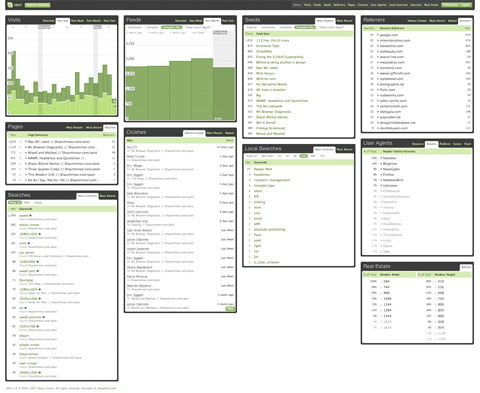
However for daily and even hourly stat reads I’m using Mint. It’s not free but at a low cost you’re getting a quick overview of where people are coming from and what they’re engaging. Seeing that traffic build up only minutes after a blog post turns you on – I promise. That’s the energy you need to keep on writing.
Is your content engaging?
Personally I’ve set up a Postrank analytics account that gives me a good idea of whats actually happening after I press that publish button. Postrank is a tool that measures the online engagement with your content. No engagement = not a good post (or at least no one else thinks so) Lots of engagement = you did something right.
Track your brand online!
Last but not least – remember to track your brand online in order to engage if people pick up and comment/debate that post of yours. I’ve written that guide on how monitor your brand online before.
Now it’s all up to you – I’m looking forward to reading your posts!